Showing posts with label accounts. Show all posts

Friday, 1 July 2022

Legacy RefWorks is being retired

The Legacy (old) version of RefWorks will no longer be available from 1st September 2022.  If you are using this version, you must upgrade your account to the newest version of RefWorks, or you will lose your references.  To do this, you can click on the Upgrade button in your RefWorks account:


Follow the on-screen instructions to copy your references to the newest version of RefWorks.  You can find more information here.

If you are not sure which version you are on, look at the logo at the top left of the screen. If it looks like this 


you are already using new RefWorks and do not need to do anything.

If it looks like this


you are using the old version and will need to upgrade your account.

If you have any problems upgrading your account, please contact us for help.

Wednesday, 15 August 2012

RefWorks login issues

If you have already been through the process of linking your RefWorks account to your University username and password (described here), you will no longer be able to user your previous username and password to access RefWorks.  If you are trying to access RefWorks and you end up at this page
RefWorks login screen
you will need to click the link "My Institution's Credentials (Shibboleth)".  If you try to enter your university username and password in the "Login using RefWorks Credentials" box you will get a message "Invalid Group Code/id, Login Name or Password combination." The best way to login is to always use the link from the library catalogue. This will automatically take you to the right login screen. 

If you have RefWorks bookmarked on your computer, change the link to https://www.refworks.com/RWShibboleth?providerid=https%3A//idp.beds.ac.uk/entity - this will take you to the right login screen.

If you haven't yet gone through the process of linking your RefWorks account to your University login, please do! It will mean you have one less password to remember, and that you can access RefWorks wherever you are without needing to use the group code.


Tuesday, 3 July 2012

Your RefWorks login is changing

From now on your login for RefWorks will be the same as your usual University of Bedfordshire login. You will need to link your university ID to your existing RefWorks account. The process is straightforward and will keep all your existing references. It will also allow you to access your account off campus in the same way as you do on campus.

The next time you access RefWorks you will be taken to a standard University of Bedfordshire e-resources login box, not the RefWorks login page. You need to login with your university ID and password.

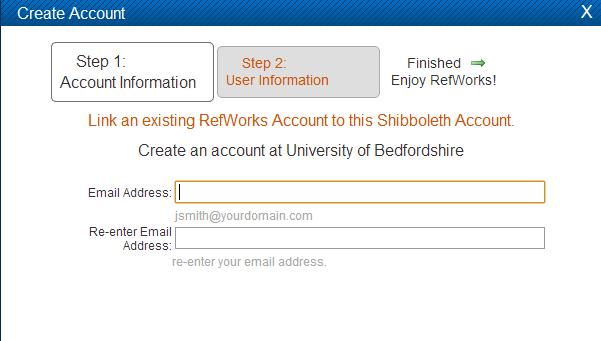
You will then see the screen below, asking if you want to create a new account or link this ID to an existing RefWorks account. Click Link an existing RefWorks Account to this Shibboleth Account. DO NOT enter your username and password on this screen under Create an account at University of Bedfordshire - you will create a new account which doesn't contain your existing references. Once you're through to the next screen, then enter your username and password for your existing RefWorks account.


If you have any problems please contact us.

Friday, 4 May 2012

Changes to RefWorks usernames

If you are a RefWorks user you will have had or will be getting an email from RefWorks telling you that your username has changed and is now the email address you used to register for RefWorks.  Try logging in with this new username and your existing password and let us know if you have any problems.

Dear RefWorks User,
We have changed your RefWorks login name to match the email address on your account. 
Your new login name is: ********@beds.ac.uk
Why did we make this change?
We’re changing the login process to eliminate the need for users to supply a Group Code – an enhancement that many users have requested. This means that have user must have a unique login name, such as their email address.
Visit the Update Profile page within RefWorks if you would like to create a different login name.
What was my old login name?  
Your old login name was: *******. You won’t need that login name anymore; however, if you have more than one RefWorks account your other login name(s) may not have changed.  
What if I still have questions?
As always, our professional support team is ready to help. You can find more information at http://www.refworks-cos.com/support/

Sincerely, 
RefWorks-COS Support Services